Markdown for Beginners: Learn Efficient Writing in 3 Minutes

Let's Get This Straight: Markdown Isn't Coding—It's Something a Fifth-Grader Could Do
Many people instinctively back away when they hear "Markdown"—it sounds like code, like something only programmers use.
But here's the truth:if you ever took notes in school, you already understand the core logic of Markdown.
Think back. How did you take notes as a kid?
- Important headings? You wrote them bigger and centered.
- Subheadings? Slightly smaller.
- Key terms? You circled them or added a star ⭐
- Listing points? You wrote 1, 2, 3 or used bullet points.
Markdown does exactly the same thing—it just replaces "write it bigger" with a simple symbol.
That's it.
3-Minute Crash Course: 6 Symbols for 90% of Your Writing
Memorize these few symbols, and you'll cover almost everything you need:
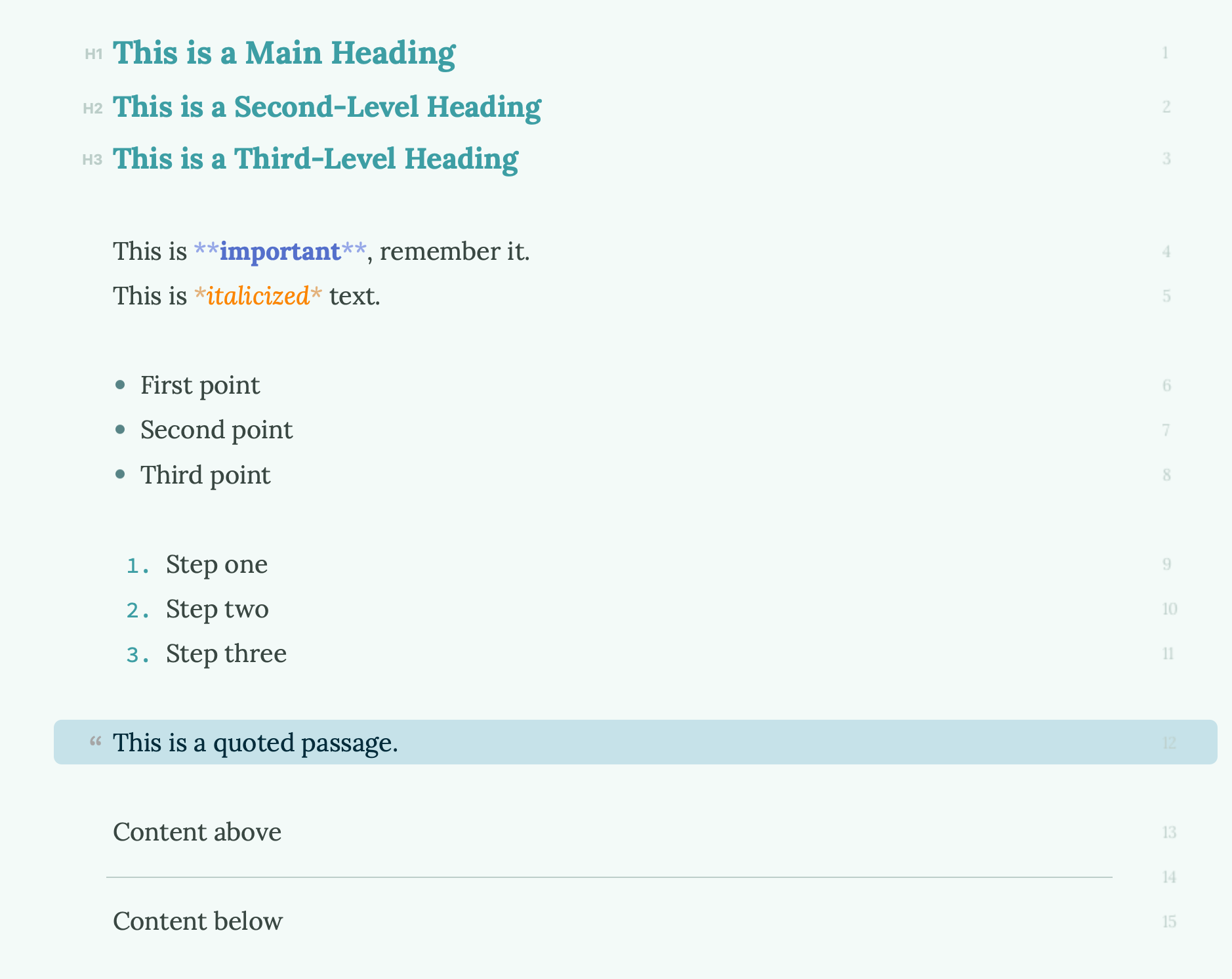
1. Headings: Use the # symbol
The number of#marks determines the heading level—just like "big heading = write bigger, small heading = write smaller" in your notebook.
# This is a Main Heading
## This is a Second-Level Heading
### This is a Third-Level Heading
2. Bold: Wrap text with two asterisks
Want to emphasize something? Wrap it with**.
This is **important**, remember it.
3. Italics: Wrap text with one asterisk
This is *italicized* text.
4. Lists: Use – or numbers
Use-for bullet points,1. 2. 3.for numbered lists.
- First point
- Second point
- Third point
1. Step one
2. Step two
3. Step three
5. Blockquotes: Use the > symbol
Want to quote something or add a note? Start the line with>.
> This is a quoted passage.
6. Horizontal Rule: Three dashes
Want to add a divider in your article? Just type---.
Content above
---
Content below
Why "Hands on Keyboard" Is an Efficiency Revolution
Here's what traditional writing looks like:
- Type your content
- Stop, move your hand to the mouse
- Highlight the text
- Click the "Bold" button in the toolbar
- Move your hand back to the keyboard, continue typing
Here's what writing in Markdown looks like:
Type, add two asterisks without thinking, keep typing.
Your flow of thought is never interrupted.
That's why so many writers, journalists, developers, and academics choose Markdown—not because it's "professional," but because it lets writing staywriting.
Three Pain Points—Modern Tools Have Already Solved Them
Many people try Markdown and give up. Usually, they get stuck on these:
Pain Point 1: How do I insert images?
Traditional Markdown requires typing something like:
Pain Point 2: How do I insert links?
Traditional Markdown requires:[link text](URL"optional title")
Honestly? This turns a lot of people off.
Pain Point 3: How do I create tables?
Traditional Markdown tables look like this:
| Name | Age |
|-------|-----|
| Alice | 25 |
Who can remember all that?
The good news:Most modern Markdown editors now supportinteractive insertion—just like in Word, you can drag and drop images, click to insert links or tables, and the tool generates the markup for you.
In apps like Effie, you don't need to memorize complex syntax. Just focus on your words.
"But Can I Actually Submit This?"
My boss / editor / professor wants Word or PDF!
This is the real reason many people hesitate to try Markdown: they're afraid the output won't be usable.
Relax—this problem was solved long ago.
Most modern Markdown tools support one-click export to various formats:
| Your Need | Export Format |
|---|---|
| Send to boss/client | Word (.docx) or PDF |
| Post on Medium, Substack, or LinkedIn | Copy-paste—formatting preserved |
| Archive for backup | Markdown (.md) or plain text (.txt) |
| Share on social media | Image |
In other words: write peacefully in Markdown, hit export, and get a beautifully formatted Word or PDF—looking just as polished (if not more) than if you'd spent ages fiddling with formatting in Word.
Markdown is your writing process, not your final deliverable.
Once you get this, there's nothing to worry about.
Wrapping Up: Start Today
The essence of Markdown is simple:use symbols instead of mouse clicks, so your hands never leave the keyboard.
You don't need to learn everything at once. A good writing tool will help you pick it up naturally as you go.
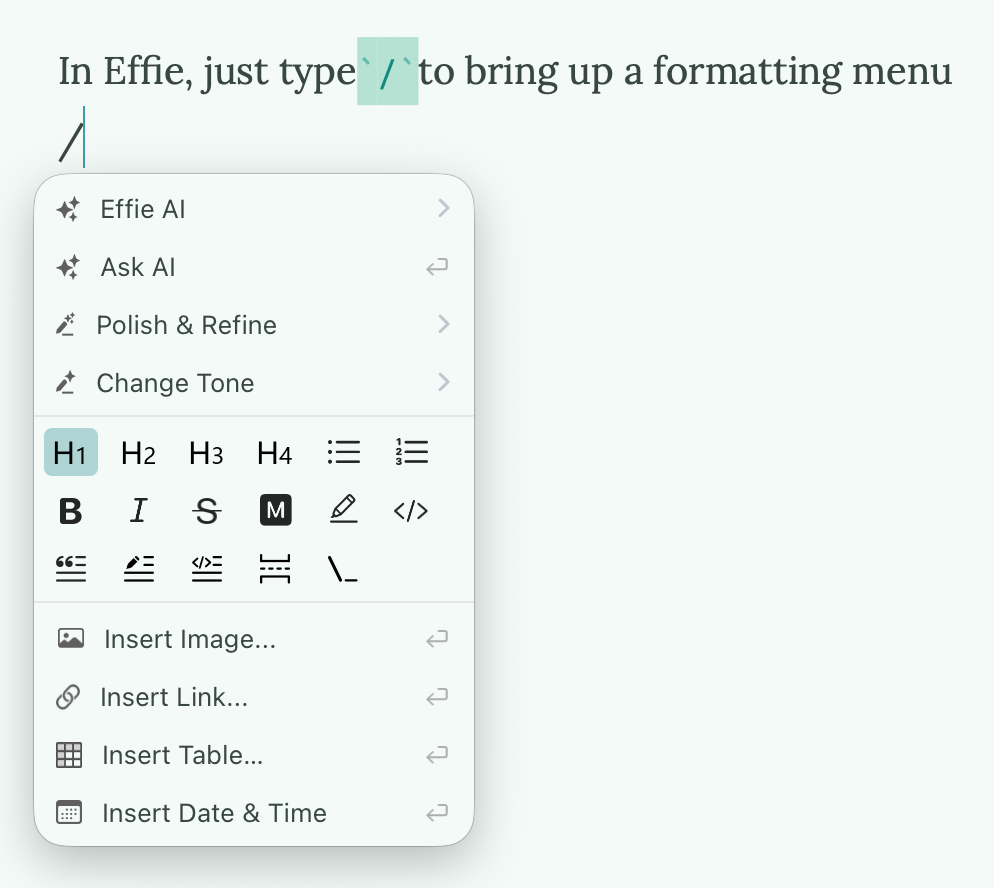
In Effie, just type/to bring up a formatting menu—perfect for when you can't remember a symbol yet. Use it a few times, and soon you won't need the menu at all.
The biggest enemy of writing has never been the tool—it's the hesitation to start.
Open a clean page. Start writing.
(If you're looking for a distraction-free writing app that supports Markdown without requiring you to memorize complex syntax, give Effie a try—designed for writers who just want to write.)